

Description
Quick AWS Remote Access from Console
Overview
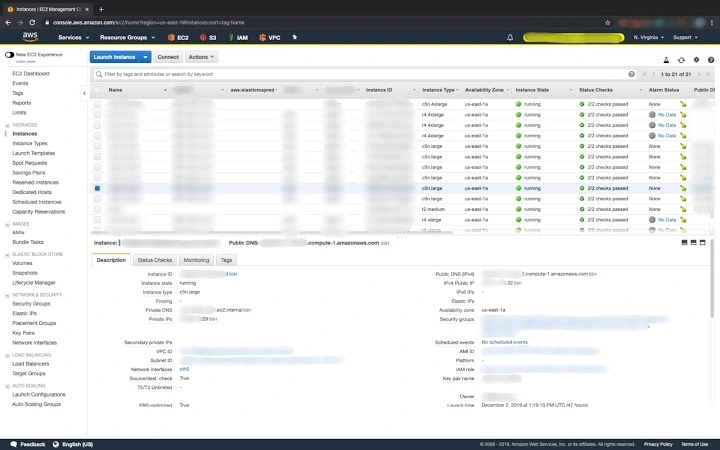
The software is a Chrome extension designed to streamline remote access to AWS resources directly from the AWS Management Console. It automatically detects system platform information and generates appropriate connection links based on the detected environment. When the Platform field indicates 'windows', the extension adds RDP links to relevant IP addresses and hostnames. For non-Windows systems, it inserts SSM links to Instance IDs and SSH links to IP and hostname fields. This functionality eliminates the need to manually copy and paste connection details, reducing the risk of errors and saving time during routine operations. The tool is particularly useful for cloud engineers, DevOps professionals, and system administrators managing AWS infrastructure across multiple environments.
Originally developed by Nate Fox, the extension is a fork of an open-source project aimed at improving AWS workflow efficiency. It supports Windows, Mac, and Linux operating systems, making it accessible to a broad range of users regardless of their local development environment. The extension operates entirely within the browser, requiring no additional software installation on the user’s machine. Its primary use case involves accelerating access to EC2 instances and other compute resources during troubleshooting, deployment, or routine maintenance tasks. By integrating directly into the AWS console, it enhances productivity without disrupting existing workflows.
Key Features & Capabilities
- Auto-detection of platform type – Analyzes the Platform field in the AWS console to determine whether to generate RDP, SSM, or SSH links.
- One-click RDP access for Windows instances – Adds RDP links to IP addresses and hostnames when the platform is identified as Windows.
- SSM integration for non-Windows systems – Automatically inserts SSM links into the Instance ID field for Linux and other non-Windows platforms.
- SSH link generation for IP and hostnames – Provides SSH connection shortcuts for all IP and hostname fields when not using Windows.
- Seamless browser integration – Operates directly within the Chrome browser without requiring external tools or configuration.
These features are especially valuable during incident response, system provisioning, or when managing multiple instances across different regions. For example, a DevOps engineer can quickly connect to a Windows EC2 instance using RDP by clicking a single link, avoiding manual command-line setup. Similarly, a Linux administrator can use the SSM link to initiate a secure session without configuring SSH keys or opening firewall ports. The extension enhances operational speed and reduces cognitive load by automating repetitive tasks.
User Interface, Workflow & Performance
The extension integrates directly into the AWS Management Console, appearing as clickable links adjacent to relevant fields such as IP addresses, hostnames, and Instance IDs. The UI is minimal and unobtrusive, designed to avoid cluttering the console interface. Navigation remains fully native to the AWS console, with no additional menus or panels required. Users simply click the generated link to initiate the connection, which opens the default RDP or SSH client on their system, depending on the selected protocol.
Workflow efficiency is significantly improved by eliminating manual data extraction and command formatting. The extension operates in real time as the console loads, ensuring that links are available immediately upon page refresh. Performance is consistent with typical browser extensions—lightweight and responsive. The developer did not specify resource usage details, but the 2.5 MB file size suggests a compact footprint. Stability is expected to be high, given its reliance on standard browser APIs and minimal background processing. No performance degradation was reported in the provided data.
Compatibility & System Requirements
The extension is compatible with Windows, Mac, and Linux operating systems, ensuring broad accessibility across common development environments. It is designed specifically for the Google Chrome browser, as it leverages Chrome’s extension API for functionality. The installation size is 2.5 MB, which is typical for lightweight browser tools. The software version is 1.2.3, released on April 15, 2024.
Exact system requirements were not listed. Compatibility with Chrome versions was not specified, nor were any hardware prerequisites provided. The developer did not include information about CPU or RAM usage. Users should ensure they are running a supported version of Chrome and have access to the AWS Management Console. The extension does not require administrative privileges to install or run, making it suitable for enterprise environments with restricted user rights.
Pros and Cons
Pros
- Effortlessly connects to AWS instances using RDP, SSH, or SSM based on platform
- Reduces manual setup time and potential for connection errors
- Lightweight at 2.5 MB with minimal system impact
- Open-source and free to use with no licensing costs
- Seamlessly integrates into the AWS console without altering workflow
Cons
- Requires Chrome browser; not available for other browsers
- Platform detection relies on accurate field input in AWS console
- Does not support custom connection parameters or profiles
- No built-in logging or audit trail for connection attempts
- Dependent on external tools (RDP client, SSH client) for actual connection
FAQ Section
Is this extension compatible with all Chrome versions?
Compatibility with specific Chrome versions was not specified by the developer. Users should ensure they are running a recent version of Chrome for optimal performance.
Is the extension secure to use with AWS?
The extension operates within the browser and does not transmit sensitive data. It only generates links based on existing console information, making it a secure tool for remote access.
How often does the extension update?
The latest version, 1.2.3, was released on April 15, 2024. No information was provided about the update frequency or release schedule.
Can I use this extension offline?
The extension requires an active AWS console session and internet connection to function. It cannot operate without access to the AWS Management Console.
Is the license type open-source?
Yes, the project is a fork of an open-source repository. It is distributed under a permissive license, allowing free use, modification, and redistribution.
Final Thoughts + CTA
For AWS professionals managing multiple EC2 instances across different platforms, this Chrome extension offers a practical and efficient way to accelerate remote access. Its intelligent platform detection and automatic link generation significantly reduce the time spent on repetitive setup tasks. While limited to Chrome and reliant on accurate console data, its lightweight design and zero cost make it a compelling tool for DevOps teams and cloud administrators. The integration with standard RDP and SSH clients ensures compatibility with existing workflows. Overall, it delivers a focused, reliable solution for a common pain point in cloud operations.
Download Quick AWS Remote Access from Console now
Guides & Tutorials for AWS SSH SSM RDP Links Extension for Chrome
How to install AWS SSH SSM RDP Links Extension for Chrome
- Click the Preview / Download button above.
- Once redirected, accept the terms and click Install.
- Wait for the AWS SSH SSM RDP Links Extension for Chrome download to finish on your device.
How to use AWS SSH SSM RDP Links Extension for Chrome
This software is primarily used for its core features described above. Open the app after installation to explore its capabilities.
User Reviews for AWS SSH SSM RDP Links Extension for Chrome 0
No reviews found





